Your first delegated task in CTM
Choose a lead you trust and a cheaper worker to implement, and review the change before accepting it.
Delegation in CTM is two independent choices in one workspace: your session stays the lead — it writes the brief, delegates the implementation, and reviews the diff — while a worker on a cheaper model does the implementing, either inside your harness or in its own tracked run. This walkthrough takes one small task, a bounded webhook retry fix in a fictional project, from brief to accepted change.
The wider case for splitting the work, and what review still catches, is in Lower AI coding costs by 70% without lowering the quality bar.
The walkthrough uses a fictional project, acme-ledger. Screenshots show the real CTM interface on an isolated instance, with synthetic data, scripted dialogue and a dummy provider configuration that was never connected — no benchmark result, no provider authentication.
Four words, kept separate
Most confusion about “picking a model” comes from collapsing four things into one word.
- Harness — the CLI running the agent, Claude Code or Codex. It decides which controls exist, including whether a session can switch models mid-run.
- Lead — the model behind your session: it plans, writes the brief, reads the diff, owns the verdict.
- Delegate — the worker: a native helper inside the lead's harness, or a routed worker in its own tracked session.
- Provider route — the connection serving a model: a direct provider, a compatible endpoint, or a gateway.
Four settings rather than one, so the same split appears in different places:
| Harness | Lead (session model) | Delegate | Worker lane |
|---|---|---|---|
| Claude Code | Fable 5.1 | Sonnet 5.5 | Native helper, in the lead's harness |
| Claude Code | Fable 5.1 | DeepSeek V4.1 Flash | Routed worker, its own tracked session |
| Codex | DeepSeek V4.1 | Qwen 3.8 | Routed worker under the same Codex harness, via a compatible route |
Examples depend on compatible routes enabled in your installation; use the exact model id your provider exposes. Qwen publishes the current Qwen 3.8 text-generation models — qwen3.8-max and qwen3.8-flash — in its model guide. Lead and worker stay independent choices, and the third row runs both under Codex, with the worker reaching Qwen through a compatible route.
Step 1: Connect a provider
Install CTM and complete setup. Make sure your chosen CLI — Claude Code or Codex — is installed. Use its native sign-in for native models, or configure provider access for routed models:
npx create-walle install ./walleOpen the local address printed by the installer. For a routed model, start with its connection. Open AI Providers → Providers and press + Add Provider. Pick a direct provider or an OpenAI-compatible endpoint, set the Connection that reaches it, and enter the credentials or base URL the provider supplied.
To extend a provider you already have, edit it and use Add route — another route on the same provider, not a second entry. Press Test Connection and read the result for what it is: whether CTM can reach that endpoint with those credentials. Success there is not evidence that a model writes good code or suits the task; you learn that by running the loop.
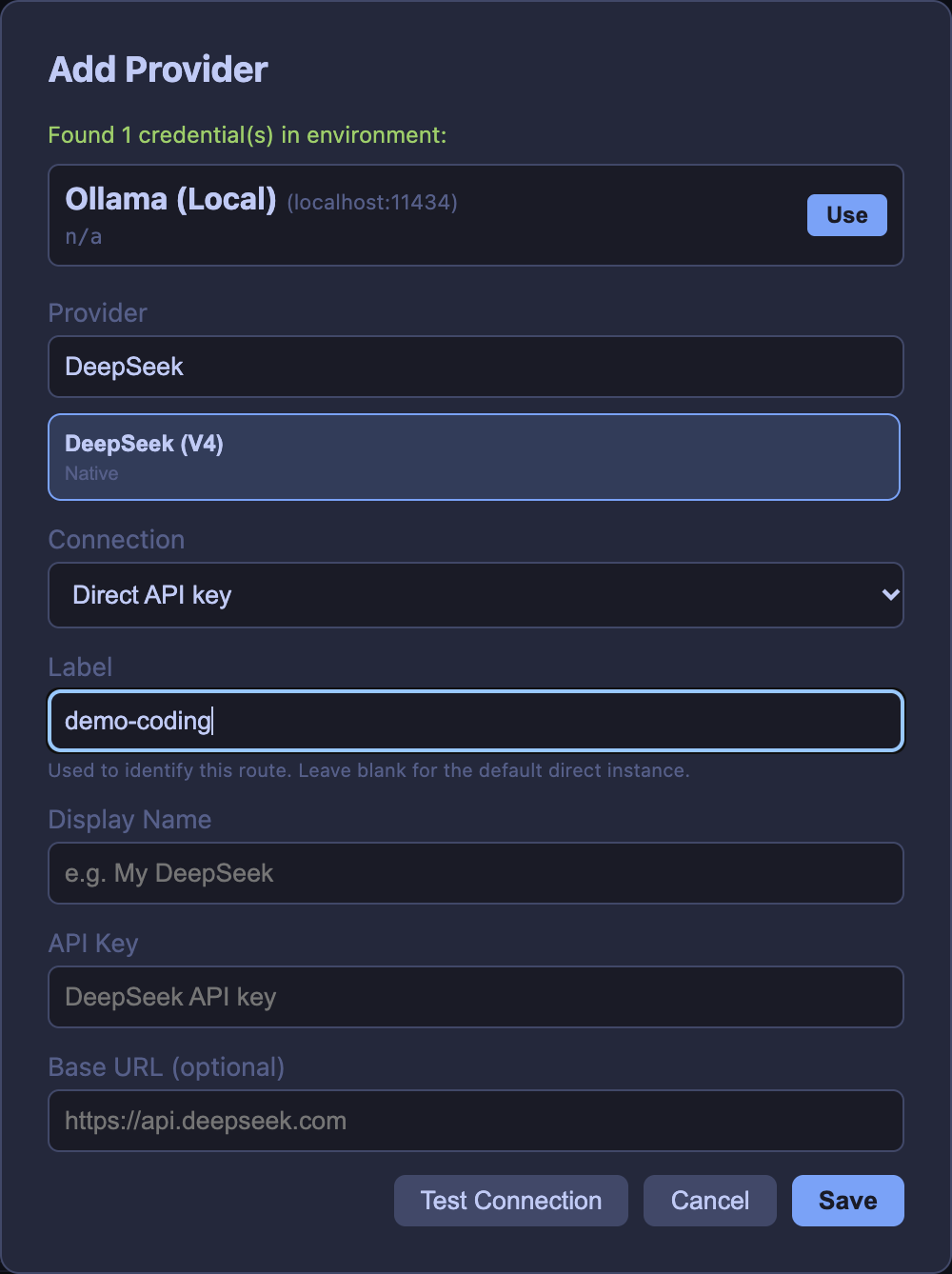
Save the provider, then confirm the model you intend to delegate to appears in the picker. If it is missing, check the credentials, whether the model is enabled for that provider, and whether that route type is compatible.
Step 2: Check the delegate skill
Delegation is a skill the lead invokes — /delegate in Claude Code, $delegate in Codex — so it has to be present in the harness. Open AI Providers → Coding Agents: the Delegated Workers section shows the delegate skill state for each agent. The skill may already be installed and current — verify it there, and use Install or Update now if CTM offers one. CTM does not automatically overwrite a customized skill. Review any Replace prompt before replacing a locally edited copy.
Two things have to be true: the lead is a session CTM launched, and Wall-E MCP is connected to it. That is the path the routing decision travels — the lead asks Wall-E for the lane and model, and Wall-E answers with the route, model and harness.
Step 3: Choose the lead, then the worker
From Sessions, click + New Session, choose Claude Code or Codex, and select your Project Folder. For an isolated change, enable Use Worktree and name the branch. Keep MCP servers → Core selected so Wall-E is available, then click Create.
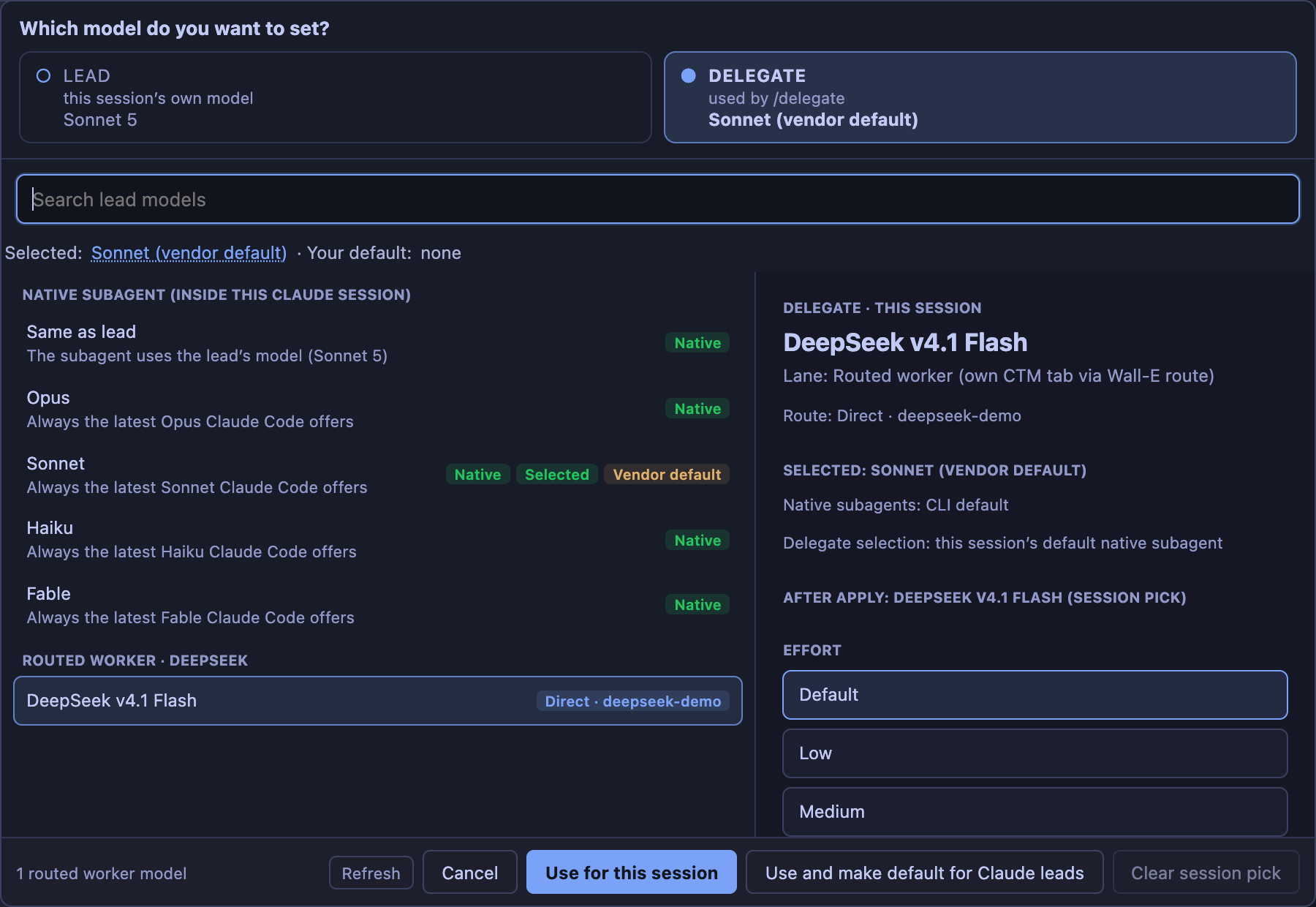
Open the model chip and you get two tabs. Lead sets the session's own model — the one that plans and reviews. Delegate sets the worker that /delegate or $delegate starts. The two are independent: you can change the delegate without replacing the lead that holds the task context.
On the Delegate tab, choose the worker with:
- Use for this session — stores your worker pick for this session. It persists for the session; it just doesn't change your agent-wide default.
- Use and make default for Claude leads — stores it for this session and as your default for that agent. A Codex lead gets the Codex wording.
- Clear session pick — drops the session pick so the picker falls back down the ladder.
The ladder is short: your session pick wins, then your saved default, then the vendor default.
A few things worth knowing. A native helper runs inside the lead's harness and may not appear as its own row, while a routed worker launches as a tracked CTM session. Naming a model explicitly in the request overrides the pick for that delegation. A lead change may need the session relaunched before it takes effect, so a selection is a preference — check the route, model and harness the worker reports back.
Step 4: Write a brief the worker can finish
A worker starts from the brief rather than from your whole conversation with the lead, so a small brief stays cheap and the task has to be stated. It can still read the repository, the project's own instructions, and any context you point it at. Recover what you already decided first — if an earlier session settled the retry cap, paste its URL into the lead and ask it to read the decision, or ask Wall-E by project.
The task below is fictional and small on purpose: in acme-ledger, retry behaviour for failed webhook deliveries is unpredictable and the fix has to be bounded.
- Objective: make webhook retry delays bounded and predictable.
- Files owned:
src/webhooks/retry.tsandtests/retry.test.ts— nothing else. - Acceptance: no delay exceeds 30 seconds, inclusive of any jitter added; retries stop after a 12-attempt ceiling.
- Checks: the project's test script for that file —
npm test -- tests/retry.test.tshere — covers the boundary at the cap and the jitter shape. - Out of scope: unrelated refactors and any other file.
Send it with /delegate in Claude Code, or $delegate in Codex. Both take an optional model phrase, and for a first task the default is right: name no model and the lead's pick decides.
/delegate Draft and implement a bounded jitter fix for acme-ledger webhook retries.
Objective: delay never exceeds 30 seconds, inclusive of jitter; stop after a 12-attempt ceiling.
Files you own: src/webhooks/retry.ts and tests/retry.test.ts — edit nothing else.
Checks: npm test -- tests/retry.test.ts, covering the boundary at the cap and the jitter shape.
You stay the lead: diagnose and write the brief, delegate implementation, inspect the diff and run the checks before presenting the result.
Two workers never own the same file: give them disjoint files or separate task worktrees, and run dependent work after the change it needs. Bounded work of three kinds repays this: a read-only research census, a focused implementation with named files and tests, and an independent review.
Step 5: Follow the loop to acceptance
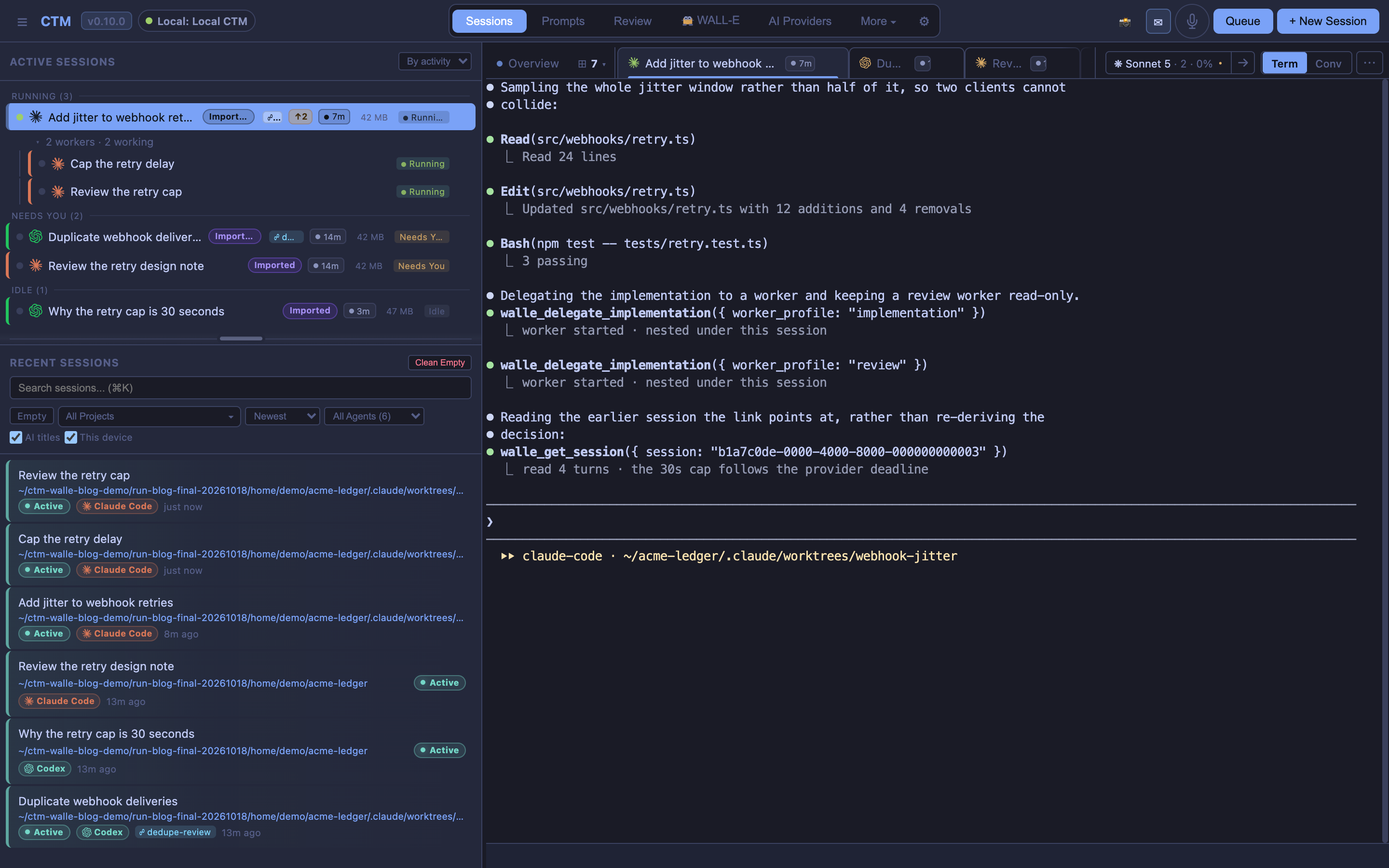
Send the prompt, and the loop is visible:
- The lead writes the scoped brief: objective, files, tests, stopping point.
- The worker appears beneath the lead while it runs.
- The lead waits for the worker's final report.
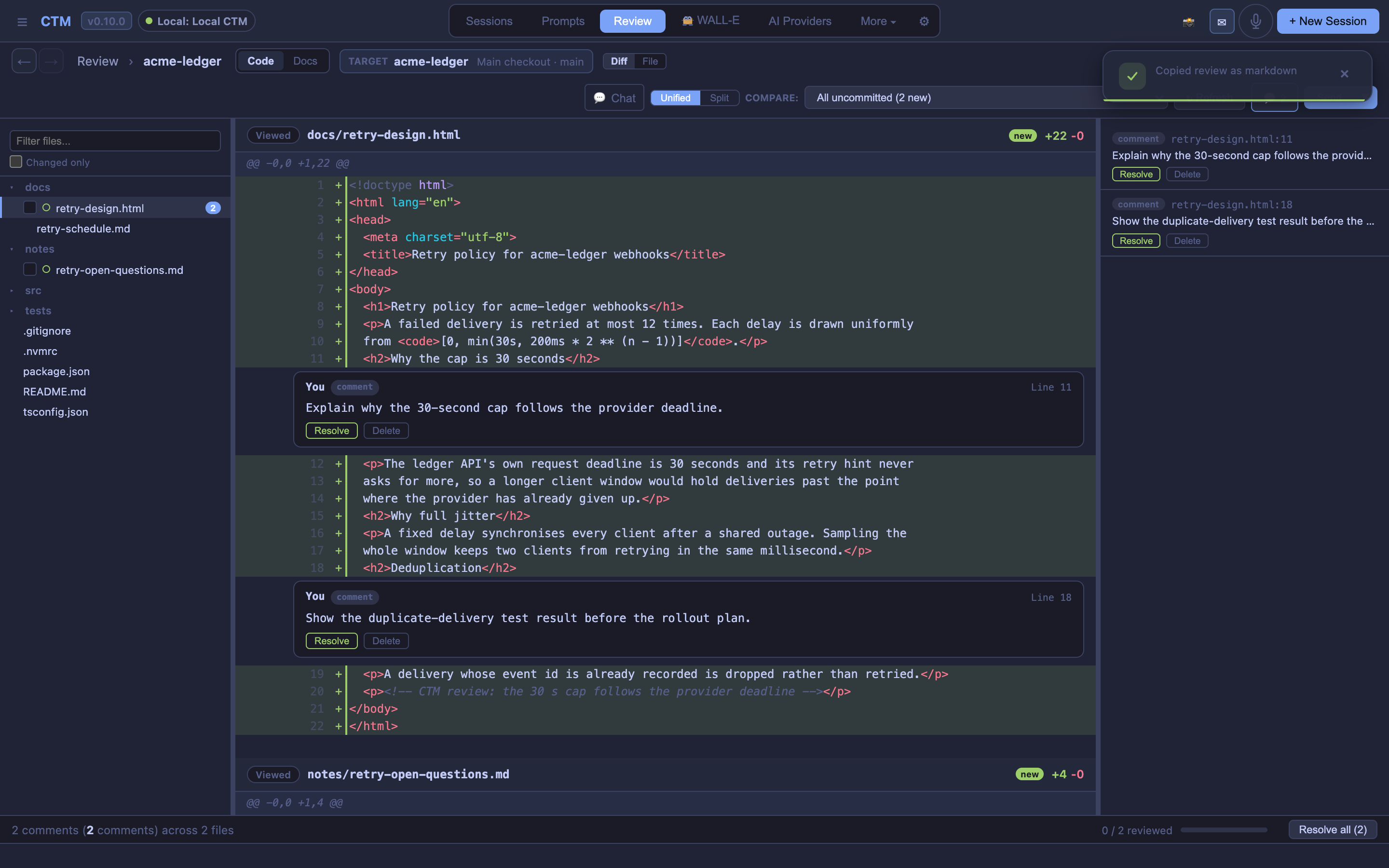
- The lead reads the diff and the evidence.
- A correction goes back to the same worker, which re-runs the checks.
- You review the final change before it goes anywhere.
Step four is where work is decided, so here is one concrete failure. The worker reports that the cap is enforced and the tests pass — but the cap was applied before jitter is added, so the worst case is 31 seconds against a slow endpoint, and an averaged assertion may miss the boundary. The correction goes back to the same worker: sample the delay as bounded full jitter from [0, min(cap, exponential delay)], so no draw can exceed the cap, and make the test deterministic by fixing the draw at its maximum.
The lesson is in the order of those sentences: finished is not accepted. A claim that the task is complete, with tests passing, is a claim about work; the diff and the tests are the work. Status and changed-file indicators describe the working tree, not who wrote a line — several sessions can share one checkout, and a native helper may not have a row of its own.
Step 6: Judge the result, and recover
Judge a delegated task on four things, not one: the accepted behaviour, the total cost across lead, worker and rework, the time to acceptance, and the review effort it took. Compare the whole task, not one run: include every repair round, not just the run that passed, and choose the worker on capability and cost rather than cost alone. Open the usage view with the arrow beside the session’s model chip. It brings session and delegated usage together; check for missing attribution or unknown prices before comparing totals. These are usage estimates, not your provider’s invoice.
Failure should be legible rather than silent: if the route you picked is unresolved or unhealthy, or the provider rejects the credentials or your budget, the lead reports it and you fix the cause — a different route, a repaired credential, a smaller task. A run should never quietly become a different model than the one you named. Configurations differ in what they expose, too: not every model supports an effort setting, and not every harness has the same switches. And a worker finishing is not a merge.
Start with one task
Pick one small, representative task in a repository you know, and run the loop once. Paste this into your lead, replacing the objective and file names:
/delegate <task>: <one-sentence objective with the bound stated>.
Files you own: <path/to/source> and <path/to/test> — edit nothing else.
Checks: <the command your project uses for that test file>.
You stay the lead: diagnose and write the brief, delegate implementation, inspect the diff and run the checks before presenting the result.
Use $delegate instead of /delegate when the lead is Codex. Choose the lead you trust to review the change, choose the worker on capability and cost, and follow the run to acceptance.
npx create-walle install ./walleAs you try delegation, track the cost of review and corrections alongside the quality of the result. For the reasoning behind that approach, read Lower AI coding costs by 70% without lowering the quality bar.